
Review · Drum machine
Vermona drumDING review
The drum machine I want to use all the time
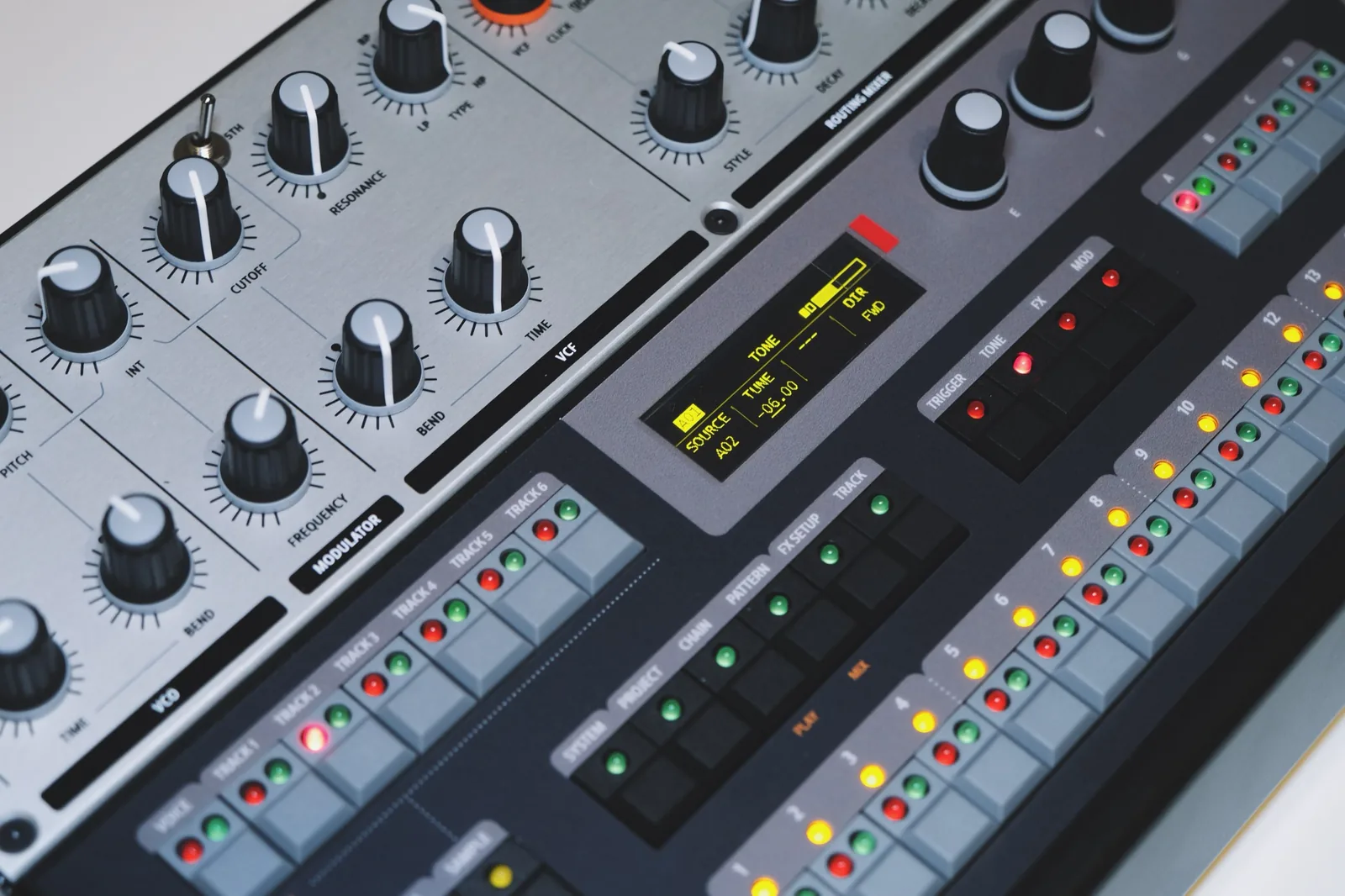
It’s really two machines in one. There’s an analog synthesizer on top and an electronic brain below. I fell in love with the design from the first photo, and after learning it hands-on I can say exactly what it is, what it does brilliantly and where it falls short.
Hear it first
How drumDING sounds
All the sounds in these demos come entirely from the Vermona drumDING.
Verdict
drumDING is a drum machine with one analog voice on top and six sample tracks below. You dial in sounds on the analog voice and record them as samples, and the sequencer plays those samples. And if you hold a track button and press VOICE, the track plays the analog voice itself, and you can turn its knobs live, on a bass sequence or a lead, for example. Its strengths are an excellent analog percussion synthesizer, some of the best controls on any drum machine, a straightforward sequencer, and support for your own samples and loops up to 6 seconds long. Its limitations: in a pattern the voice is trigger-only, with no notes and no effects, it takes up one of the six tracks, and the manual doesn’t cover this yet. Swing is global only. You can’t play notes over MIDI, only trigger sounds. And loading another project stops playback. It costs €1,499. It’s the best fit if you want to build your own analog kits and make grooves by hand in the studio, and tweak a live analog bass or lead on stage. For live sets with frequent track changes, or for playing notes from an external sequencer, there are easier machines to work with.
Recommended for
- Collectors: a niche, boutique machine people will remember
- Making your own kits from your own analog sounds
- Techno and electronic music, made by hand in the studio
- Writing a full track in one box, with no menu diving
- Live techno sets where the bass or lead is a live analog voice
Not for
- Live sets with instant project changes (unless you run two)
- A live set where every instrument is a live analog voice (there’s only one here, and an Analog Rytm is better for that)
- Playing notes on it from an external sequencer
Ratings
What I love
- The analog synth is a 10 out of 10 for percussion: punchy, clean, with character
- You can put the analog voice on a track and turn its knobs live
- The best controls I’ve used on a drum machine, everything in its place
- Two LEDs on every step show where you are and whether the step holds a lock
- Two separate delays, each with its own send on every track
- Loading samples is simple: take out the card, copy them over, put it back
- Good connectivity: six individual outputs, MIDI in and out, clock sync and a trigger out
- Program Change support makes it easy to use with other gear
- Samples up to 6 seconds, so loops, pads, textures and slices work too
- You feel the quality in every knob and button
What holds it back
- The voice on a track still feels like a workaround, not part of the workflow: it’s just a trigger, the sequencer can’t set a note for it, and a melody means turning the pitch knob
- The voice takes up a track, the effects (on the current firmware) and parameter locks don’t work on it, and none of this is in the manual
- Swing is global only, not per track (Vermona says per-track swing is planned)
- No processing on the master output: no compressor, saturator or EQ
- You can’t play notes over MIDI, only trigger the tracks and the voice
- The analog knobs can’t be controlled over MIDI CC, and the manual has no CC table
- Loading another project stops playback
- No audio over USB, the port is MIDI only
- Closed project format
drumDING at a glance
- Type
- Drum machine with one analog voice and six sample tracks
- Samples
- 32 per project, WAV, 48 kHz, 16-bit, up to 6 seconds each
- Patterns
- 64 per project, 1 to 64 steps, one chain per project
- Sequencer
- Parameter locks, ALT-locks, probability, micro-timing, repeats
- Effects
- Two delays and a reverb on sends, drive, bit reduction and amplitude modulation on every track
- Outputs
- Stereo main, six individual track outputs, analog voice output, headphones
- Inputs
- External input into the analog voice
- MIDI
- DIN in and out, USB (MIDI only, no audio), Program Change send and receive, clock in and out
- Sample shaping
- Tune (playback speed), forward or reverse, volume envelope with ATTACK, HOLD and DECAY up to 6 s each
- Storage
- SD card
- Size and weight
- 33 × 21 × 11 cm, 2.5 kg
- Price
- €1,499 at Thomann, November 2026
- Firmware tested
- 1.0
I bought my drumDING with my own money at Martin Pas. Before publishing, I sent this review to Vermona so they could check the facts. The opinions are mine. SynthyCraft sells a patch book for drumDING, so I know the machine well and I have a reason to like it. I tried to be honest about what it can’t do, too.
In this review 20
Love at first sight
I first came across drumDING by chance. I saw a photo of this drum machine in my social feed, and I fell in love with the design at first sight. It looked really original and unique to me. What also hooked me was that it’s not too big and not too small. It’s just the right size. And I liked how it’s designed, its materials, its knobs, its buttons. This really is something fresh and new, especially since full-fledged drum machines don’t come out very often. So drumDING caught my eye right away.
I tried to find one in stores, and that was pretty hard. Vermona released a batch and sent it out to stores, most of them sold out very fast, and it was hard to find one in stock. I found mine at Martin Pas, a synth shop in Turin, and a big thank-you to them. First, they had something this unique and niche in stock, and second, they delivered fast. This shop was a real find for me. They deserve praise for the service and the quick replies. They really know their stuff, they really did stock a niche instrument, and they’ve earned a small mention in this article.
Unboxing
Unboxing my drumDING from Martin Pas.
Vermona, a brand with history
It’s important to understand where this drum machine comes from. Vermona isn’t just a maker of music gear. A German viewer commented on one of my videos that it’s part of East German engineering culture, which survived the socialist era and German reunification and still makes original instruments. I wanted to dig into the history, and it turned out to be even more interesting.
VERMONA started as a brand of a state-owned East German factory, VEB Klingenthaler Harmonikawerke in Klingenthal. This is the Musikwinkel, a corner of the Vogtland where musical instruments have been made for centuries. Back in 1677, Germany’s first violin makers’ guild was founded in nearby Markneukirchen. The VERMONA logo first appeared on the factory’s keyboards in 1972, and the electronics were developed and built at its plant in Schöneck. They made the ET 6 organs, the ER 9 rhythm unit, the Piano-Strings string machine, the monophonic VERMONA Synthesizer in 1983, and in 1986 the DRM drum machine with analog voices and MIDI.
And this was in a country where parts from the West couldn’t be imported because there was no hard currency, and consumer electronics were last in line for components. According to the factory’s chronicle, the SK 86 keyboard needed about 200 chips from the GDR and the Eastern bloc, where a Western instrument got by with about 40. So they really made great instruments with what they had to work with.
After reunification, the factory stopped making electronic instruments, and in 1992 it was shut down. But the people stayed. In the fall of 1990, three of the factory’s developers, Bernd Haller (who designed that VERMONA Synthesizer), Lothar Dietrich and Thomas Buchheim, founded HDB electronic in Markneukirchen. In 2000 they got the VERMONA name back, and in 2001 they released the DRM1 MKII drum machine under it. Then came the Kick Lancet, the Mono Lancet, the PERfourMER, the limited-edition ’14 synthesizer and Eurorack modules.
Today, according to Vermona, all production, from the circuit boards to assembly, testing, packing and shipping, happens in Erlbach, a district of Markneukirchen just a kilometer from the town itself, and whenever possible they use suppliers from their own region and the rest of Germany. So when I say this is a niche, boutique instrument, that’s not just talk.
How drumDING came to be
The story behind this drum machine is pretty interesting. The way I remembered it, the guys who made it were just experimenting with a synth, built an engine and then decided to put the two together. One person did the analog part, another did the digital part, and drumDING started as an experiment. Vermona’s Thomas Haller tells the story in more detail in an interview with Stromkult.
It started a few years ago with Hans, one of the people at Vermona, who began experimenting in Pure Data with a drum sound generator loosely based on Vermona’s Kick Lancet and kept growing it just for fun. The team wanted to capture those sounds at the press of a button, and that idea became the instrument. The analog voice builds on ideas and circuits from Vermona’s DRM1, much of it rethought. Vermona built the sequencer and sampler hardware, and Sebastian Preller wrote the software. He was a developer at MFB, and he also runs his own company, Floating Point Instruments (formerly ERM), which makes the Multiclock. “Drumding” was simply the name of the project folder on the server. It stuck after the prototype appeared at Superbooth 2025, and the machine went on sale in August 2026.
What drumDING actually is
Going by the description, it’s hard to tell at first what this drum machine actually does. But once you’ve worked with it, it’s simple. What you really have is two machines in one.
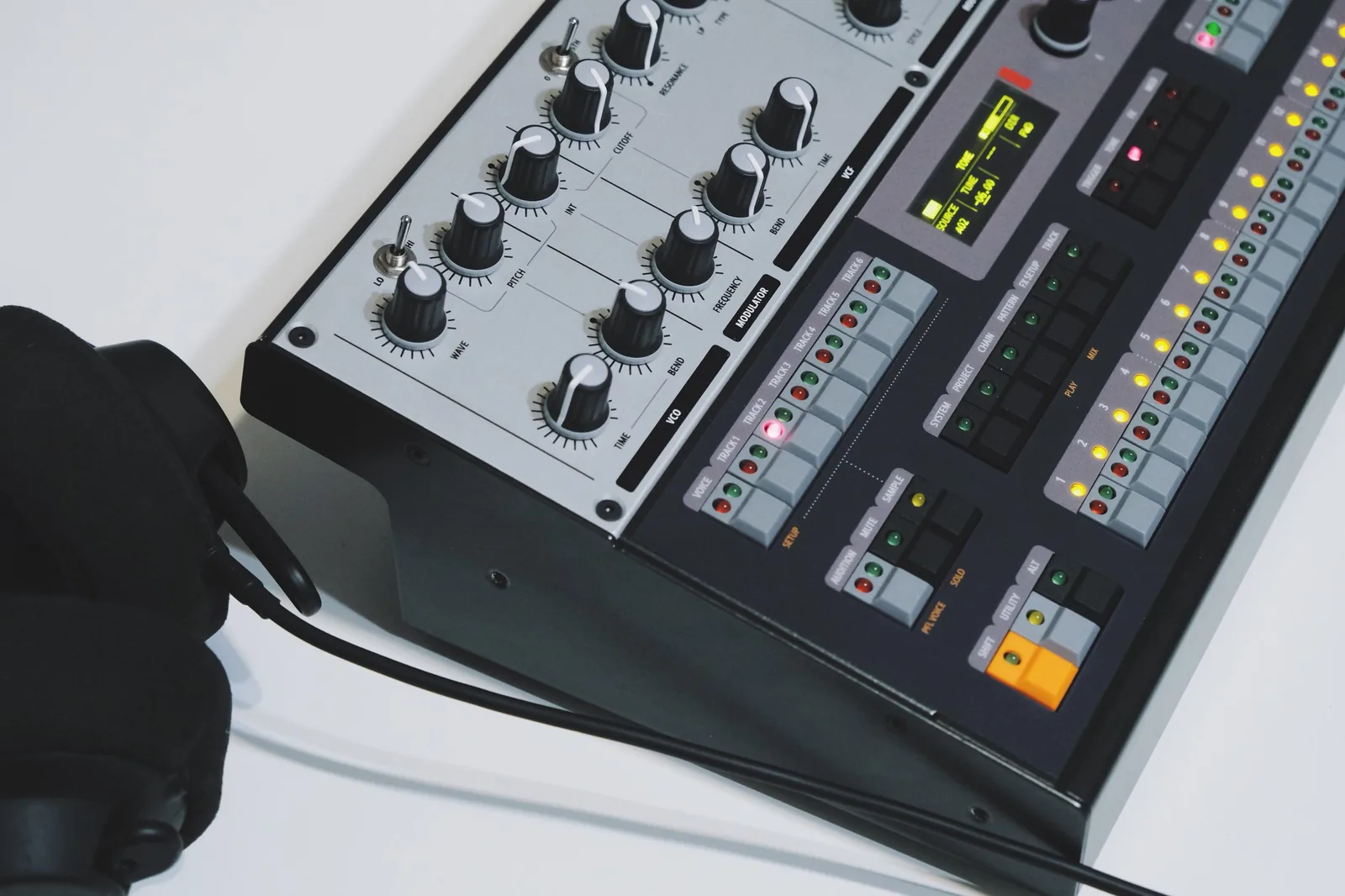
The first is an analog synthesizer. It sits on top, and that’s where you dial in sounds. There’s an oscillator, a modulator, a filter, a VCA, noise and a click, with a routing mixer that also takes an external input.
The second is an electronic brain. It records one-shots from the analog synthesizer, and you can instantly assign them to a track or to a sample slot. So below you have the one-shot recorder, the sequencer, the settings and the effects processor. Those are all the main controls for running the drum machine and making music.
And here’s the main thing. First and foremost, the drum machine plays samples. You dial in the voice, audition it with a trigger, and then you record it into a sample slot or straight onto a track and use it. That’s the whole idea. The six tracks play samples, up to 32 per project, stored as short WAV files on the card.
But you can still play the analog voice. At first it isn’t obvious, the manual doesn’t describe it as of this writing, and it was Vermona who told me how to do it. Hold a track button and press VOICE, and the voice is assigned to that track. From then on the track triggers the analog voice. Micro-timing works, and you can turn the voice’s knobs live, right in the middle of a performance. The effects, though, don’t work on the analog voice right now, on the current firmware. On top of that, there’s only one voice, and it eats up a track. And of course there are no parameter locks on it. The track is simply a trigger for it. Most likely there can’t be any parameter locks at all: the analog knobs have no digital link to the drum machine’s brain.
Still, for now, using the analog voice feels more like a workaround on Vermona’s end than a real part of the drum machine’s own workflow. Right now the sequencer doesn’t even let you program note changes for the voice, which is a big limitation in itself. If I need to write a melody, I can’t. I can only trigger the sound, and to change the melody itself I have to turn the pitch knob on the instrument, which isn’t the most convenient way to do it. So really, all you can do is trigger it from the sequencer, and you can’t process the voice with the built-in effects. So on this front, I think it’s all still very rough. That said, there’s no doubt that being able to at least trigger the voice is already a plus.
The fact that you can tweak a real analog sound live is wonderful. So drumDING has a complete analog voice that you can record as samples, and also play during a live set: a track triggers it, and you turn the knobs live while the track plays. For techno this is ideal, when you’re building a track around a bass sequence or a lead. It definitely makes a track feel alive, dynamic and real, and lets you put on a real live performance. Even if it’s just one voice, for techno and electronic music that’s more than enough. Either way, it’s cool.
The drumDING analog synth, 10 out of 10 for percussion
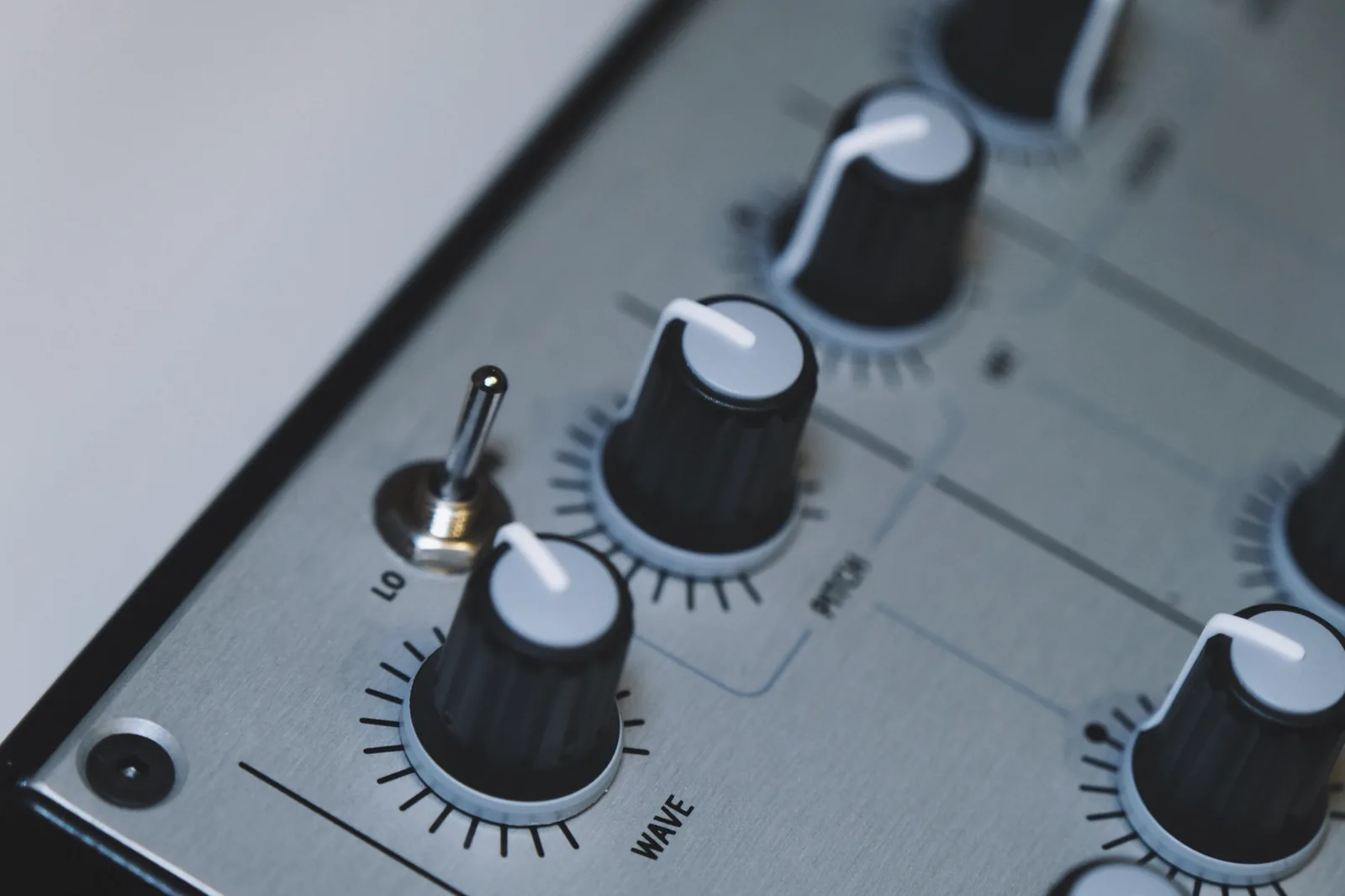
I have to say that the analog synthesizer is incredibly good for percussion in particular. It’s pretty intuitive once you understand the logic of the knobs and patches and how it all works. You can dial in the sound you need really fast, without wasting any time, whether it’s a kick, a snare or a clap, and they come out really good. They come out punchy, they come out clean, they come out with character. You can get a unique sound out of it. So as a synth on its own, for percussion, it’s probably a 10 out of 10. I’ve had a lot of synthesizers, and not every one of them lets you really dial in a good kick or make a clap. The Vermona drumDING does a great job of it.
It really offers a wide range of sounds, not just for percussion. You can make bass sounds and other melodic sounds too. The sound fits techno and electronic music well. Overall, a super positive experience.
I also really liked the quality of the knobs, and the fact that the bidirectional knobs, like the routing mixer and the bend controls, have a center detent for when you want to put a parameter back to its default. Incredibly handy. Small details like this make a huge difference. It’s really cool. And the knobs feel nice to the touch.
More examples of how drumDING sounds
Live jam One voice, six tracks, from scratch Techno live jam First live jam Sound demo Groove With external samples
No sounds out of the box
But let’s dig deeper: what’s the fun part and what’s the downside? The fun part is that the drum machine came to me completely bare. That’s it, there’s nothing in there. Not a single sound, not a single project. It’s just empty. So you have to learn synthesis and learn to make patches on the drum machine. If you have the experience and know how to dial in a kick, that’s a plus. If not, you’ll need to learn a bit of sound synthesis. But that’s no problem. For beginners I made a patch book that lets you build your first kit on the machine from scratch.
What’s good about all this? It really is that magical process where you create your own unique sounds by hand, and as far as making music goes, it’s a truly enjoyable and honest process. It’s a real musical process where you create your own collection of sounds, and these sounds are yours. You dialed them in with your own hands, so on this drum machine you’re creating a signature sound that’s as personal as it gets.
Hear the book
All 32 sounds from the patch book
Every sound from the book, sampled from drumDING as it sits in the ready-to-play project that comes with the book. Press a pad to play it.
Bank A
Bank B
The sounds run out, the voice doesn’t
But there’s one thing to keep in mind. The number of sounds you can dial in still isn’t infinite. You can make 10 good kicks, OK, 20 different kicks that are really distinct and usable in a track. That’s the ceiling. And sooner or later you’ll have built the whole collection, dialed in every sound you can, your best collection of one-shots from the analog section.
Yes, you can even download a collection like that ready-made, as a sample pack of one-shots, and it will sound the same as if you had turned the knobs yourself.
But the voice itself won’t run out. You can put it on a track and, during a live set, play it as a live sound, turning every knob right while the track plays. A recorded one-shot always sounds the same, while a live voice sounds new every time, and no sample pack can replace that. So the top section isn’t just there to build a kit. It stays an instrument you play.
Analog morphing, and a full track made on drumDING
But there’s another huge plus to having analog synthesis right there at hand. When you build your kit and, say, dial in a clap or a percussion sound by turning the knobs, you can come back to it later if you hear that it sounds too harsh, or you want to change it and make it softer. And it’s a truly unique experience: you’re literally doing analog morphing, replacing samples with new versions and listening to how it sounds. It lets you perfect every kit you build from your own analog sounds.
I also have to say that all the sounds created in the instrument sound very clean and very good on playback. They sound cohesive, and they add up to a unique sound, because they share the same natural character. Yes, they’re one-shots, and yes, you can easily move them anywhere and they’ll sound the same. But don’t forget they were still created inside the drum machine, by the drumDING synthesizer, maybe with your own hands, and it’s all in one place. So the picture you end up with is simple and cool. You have nothing, emptiness, you dial in the sounds yourself right inside the drum machine, and you get music right away. You go from zero to a full groove. That, I think, is the real magic of this machine and what makes it unique.
And here’s the proof. In this video I put together a full techno track on drumDING, and every sound in it was recorded from its synthesizer, without using any external samples.
You have nothing, emptiness. You dial in the sounds right inside the drum machine, and you go from zero to a full groove.
A full techno track I made on drumDING. Every sound was recorded from its own synthesizer, without a single external sample.
Your own samples, loops and slices
Another important thing: drumDING doesn’t just play one-shots, it plays loops too. You load your own samples via the SD card, and a sample can be up to 6 seconds long. That’s great, that’s plenty to work with. You can make a loop, add it as a sample, put it into a pattern, and you get not just one-shots but real pads, textures and so on.
There’s no warp, so a loop isn’t time-stretched to the tempo. But if you set the project tempo exactly, loops fit the bar perfectly. Of course, this is the hardcore, old-school way we’re used to from hardware, but it works. TUNE changes the playback speed rather than the pitch alone, so you can use it to nudge a loop to the tempo too, but the pitch shifts along with it.
Slices are no problem either. You cut a loop into pieces beforehand, load them into slots, and pick the slice you want on each step with a parameter lock on SOURCE. It’s easy to program. Or you just trigger the whole loop in time with the project.
Still, I miss proper loop handling. Right now I can slice a loop by hand and program the sequencer around it, or match a loop to the project BPM and get full use out of it. But I think drumDING repeated the mistake of Elektron, which also underestimated loops at first: the first Digitakt played loops but had no warp. And loops matter in a track anyway. They set its character and add depth and texture, which is pretty hard to get from one-shots. Slicing is really well done on the Polyend Tracker: you pick a sample and assign the slices straight to the keys you want. And with warping you just pick a sample, it fits the project tempo on its own, and you can still pitch it and do everything else. Of course, this isn’t a critical feature. After all, this is a drum machine first and foremost. But you always want something more, especially when you want to make it your main instrument and write music in one place, without separate external samplers, synths and everything else.
One important thing to know: samples have no gate in the usual sense. The length of a step doesn’t cut the sample off, so once you trigger it, it plays all the way to the end. That said, every track has a volume envelope with ATTACK, HOLD and DECAY, up to 6 seconds each. You can use it to limit how long a sample sounds, and with a parameter lock you can give every step its own length. It’s still not a gate that holds the sound for as long as a note is held. I would add a gate for samples, although that might also be extra functionality that bloats and complicates the machine.
drumDING vs Digitakt, Digitone II and Analog Rytm
Right away, I get the criticism many people have: in the end these are recorded one-shots, and an Elektron Digitakt, for example, can do the same thing and play samples. And yes, if you move the samples from drumDING to an Elektron, they may sound the same, or be practically indistinguishable. Yes, you could say that you can take a Digitone II and dial in your own sounds the same way and get a kit and music out of them. Yes. But let’s not forget that it’s still a digital instrument. Maybe you’ll point to the Analog Rytm and say that it has real, true analog sounds that play live, not just recorded one-shots. I agree with that too: on drumDING only one voice plays live, and the rest are recorded one-shots.
But then a second question comes up. Do you like this sound? Do you like the workflow, the way you work with it? Do you like the sample management, the way the machine feels in your hands, the way it looks to you? Do you like how the sequencer works, how the built-in effects work, and most importantly, can you write a full track on the machine itself, without any other external instruments? That’s the main thing, and it’s probably why I fell in love with the Vermona, even though a Digitakt can play samples too and an Analog Rytm could easily compete with it.
The best controls I’ve used on a drum machine
When I look at this drum machine after a lot of experience with all the other drum machines I’ve had (Jomox, the Erica Synths Perkons HD-01, the Elektron Digitakt, Digitone II and Analog Rytm, an LXR, Roland, Akai, Maschine+), I realize this is the machine I want to use all the time. Why? Because it has the best controls. It really is as easy as it gets for making patterns, running the sequencer and assigning all the functions you need, and everything is very intuitive. You can put together any beat on it very quickly and easily.
I can’t say that any one thing about the controls is the best. It’s the balance of everything together that makes the difference. Not any one feature, but the balance in how they built the sequencer and how they designed it all, with everything in its place. Placing steps is easy, parameter locks are easy, scrolling through samples for a track is easy. You don’t need to go into any menu, you just turn a knob and pick another sound. I don’t need to dive into dozens of menus the way you do on an Elektron. I don’t need to jump through hoops when I want to load samples. I just take out the card, copy over the samples I need and put the card back.
And when a sequencer is built to be comfortable, clear and easy to use, I use practically every feature it has. That means probability, per-step tuning, micro-timing to shift a step, and the ALT-locks, an alternative set of values. I’ll be honest: on many drum machines I didn’t use these, simply because they were not very clear, or awkward to use, or too complicated. Here, once you understand how it works, it’s all pretty simple. I especially like the two LEDs on every step of the sequencer. One shows the step, and the other shows that the step holds changes: red for a parameter lock, green for an ALT-lock. In my opinion, that’s priceless.
There are small gripes too. I used the very first firmware, 1.0, and it has no per-track swing, only global swing. In my opinion, every single track should have its own swing. That’s exactly how you make a real, proper groove, not by shifting everything in sight. I wrote to Vermona about it, and Thomas at Vermona replied the same day that per-track swing is already on their list and that they plan to add it to the TRACK page, the same way it works now between the project and the pattern. Until then you can use an ALT-lock: it lets you set uTIME for all the steps with that lock at once.
And it’s a machine you don’t forget. It takes the fewest button presses, and even after a month or two you still know where everything is. You only have to learn it once, because everything is as intuitive and clear as it gets. Every button has its own section, every function is labeled, and everything is very, very easy to use. Maybe only the Polyend Play is simpler (it’s probably the record holder for simplicity), but the two machines follow completely different logic, and in your hands the Play feels more like a digital gadget than a solidly built piece of hardware.
So I’d give this drum machine’s controls a 10 out of 10. It’s probably one of the best interface designs you could come up with for a drum machine. Of course there are things to improve, but today few drum machines are this easy to use.
SynthyCraft Award 2026
Best Hands-On Design
This award is for a well-designed sequencer and control interface, and for hands-on analog controls that work together with it, so an idea turns into a finished groove fast.
See the award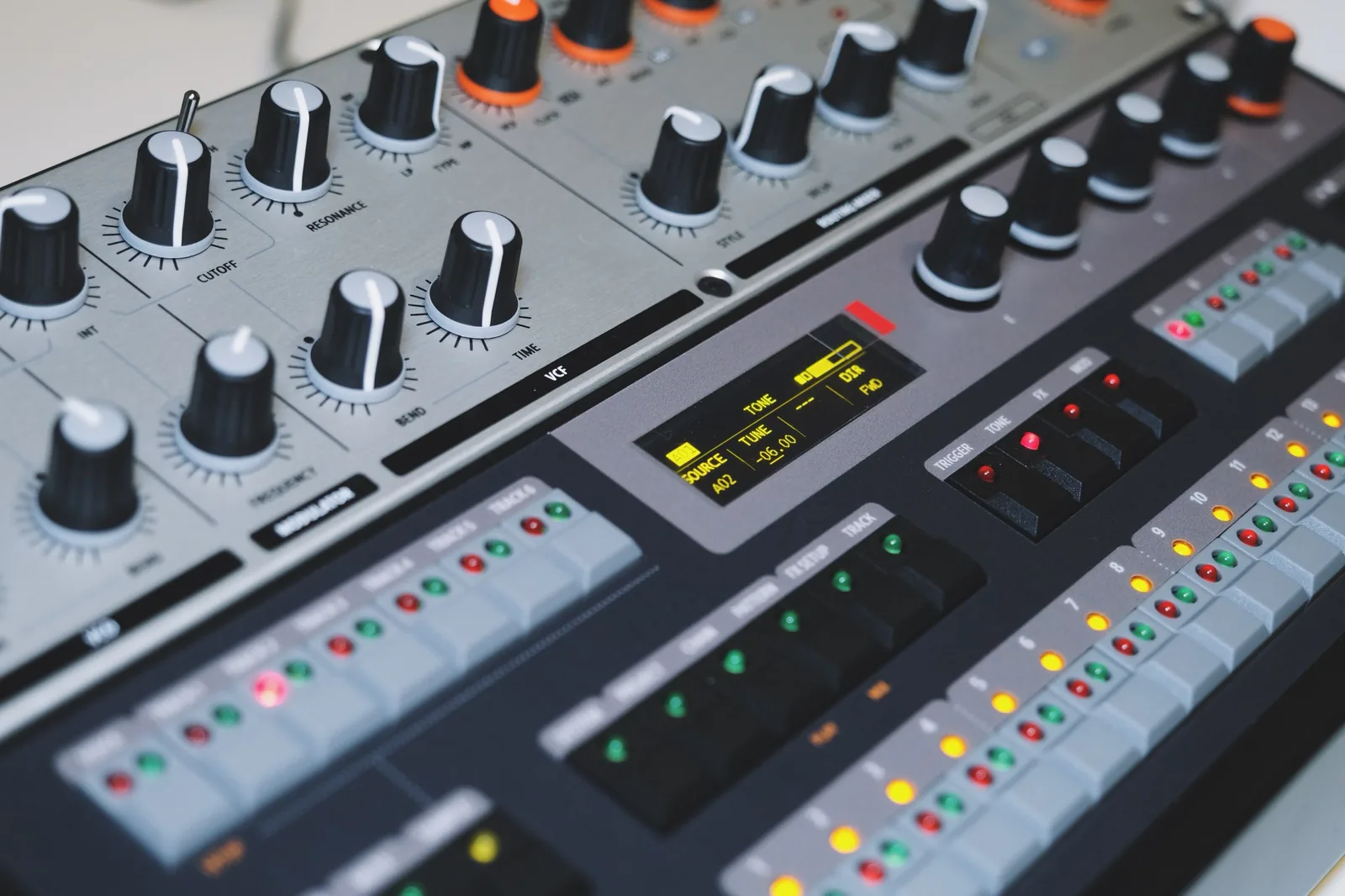
The drumDING effects
The effects, though digital, are beautifully done. You can use the two delays independently, and every track has its own send to each, which is a huge advantage, because every instrument can have its own rhythmic pattern. Some sounds need a short delay, others a longer delay with a long tail. Whoever implemented this deserves special praise and thanks. The reverb sounds good too. There’s also a great drive that I like. It colors the sample nicely and makes it more pronounced, punchier and brighter. And there’s amplitude modulation, two parameters on the FX page next to DRIVE and BITS. AmFREQ sets the frequency of the modulator, from about 32 to 3,300 Hz, and AmINT sets the depth. Because the modulator runs at audio rate, it’s not a tremolo but closer to ring modulation: it adds new, inharmonic overtones to the sample. At low frequencies the sound starts to rasp and rattle, and at high ones it turns metallic and bell-like. Both parameters can be modulated by the LFO and by velocity, so the sound can also move on its own. I call it sound morphing: when you tweak them, the sound changes and transforms, the result is really unique and interesting, and it’s perfect for techno.
I also missed having some processing on the master output. Even though the drum machine sounds really good, I’d still add something there. A compressor, a saturator, maybe an EQ, a basic mastering chain to glue the sound together. It’s not a deal breaker, because you can always process the sound later in any DAW or run it through external compressors. But if I were looking at it as my main everyday instrument, the one I make music and grooves on and really work with, not just play around on now and then, I’d want a finished, complete machine.
Playing drumDING live
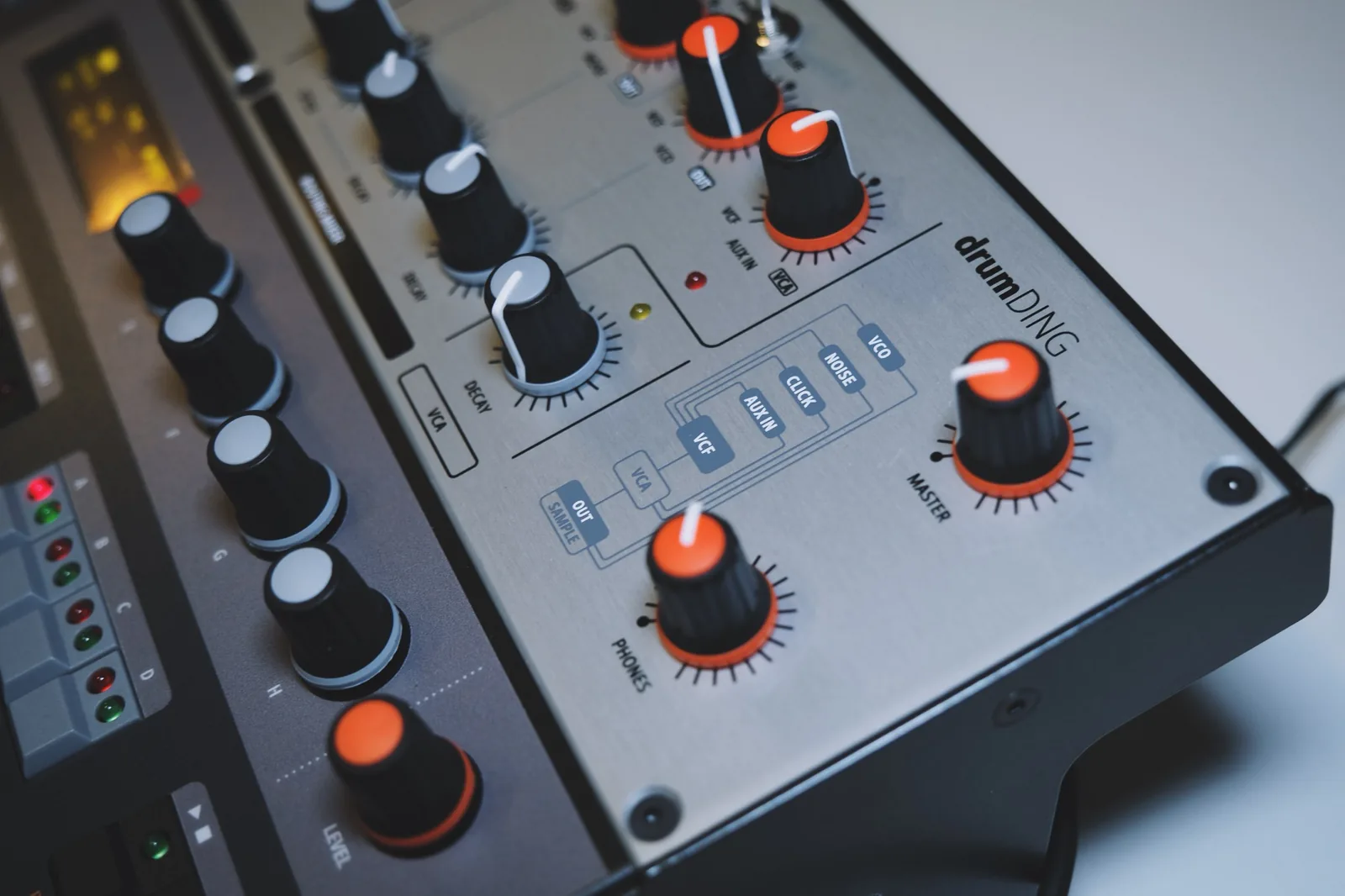
Another sticking point is how much knob tweaking you can do in a live performance. Here you have to break things down. First, you can write a full track on it, a composition that plays on its own. There’s a handy chain function. You make different patterns, like you would for a full track, then program their order, how many times each pattern plays, when it switches to the next one and so on. So yes, you can write a whole track, press play and play it from the drum machine, or improvise live. You can make one pattern and bring instruments in and out with track mutes, and play live that way. Start with the kick, add the hi-hat, then the snare comes in. There’s also a handy Fill function. You can make any parallel pattern and use it creatively, like a long snare fill when you press Fill, or whatever else you come up with. It all depends on the musician’s imagination, but it’s flexible. And if you set a track’s direction to random, it plays its steps in random order, which is good for dynamic, abstract music where you play with textures and broken rhythms.
And for turning knobs live, there’s the analog voice. Put it on a track, and you can tweak and tune it live, right in the middle of a performance, and that opens up a lot of possibilities. Put a bass sequence or a lead on the voice, and right away the track feels alive and real. But it’s only one voice, not every instrument. The rest are samples. You can tweak the samples too, with different effects, and the amplitude modulation, AmFREQ and AmINT, gives the sound the most movement. When you tweak them, the sound changes and transforms, it sounds good and it’s perfect for techno. So what you get is a live performance on analog knobs you can turn in real time, plus samples you can tweak with effects. You can’t morph literally anything the way you can on certain Elektron machines. In terms of logic, it’s closer to an Elektron Digitakt, only with a live analog voice.
And if I did decide to play a live set with drumDING, I’d still need two units, because you can’t switch between projects instantly. A project holds 32 samples and 64 patterns, so a new track needs new samples, and for that you need a separate project. And I won’t be able to switch smoothly to another project during a live set, because it stops while the new one loads. Unfortunately, drumDING doesn’t have seamless loading. So you need two drumDINGs that you can sync and switch between smoothly. This is actually a pretty common setup, not a deal breaker, but still.
MIDI and Program Change
I did get to test Program Change, and it’s really handy. With Program Change, drumDING switches patterns on another device with no trouble. That means you can pair it with any device that supports Program Change, which certainly makes working with other gear easier. In many live sets, if you want to make them deeper and more interesting, loops are a must-have for a fuller track without that obvious hardware, drum-machine or minimal character. I tested it myself with a Torso S-4, because for me it’s the simplest way to add loops, and it all works great.
But one downside I noticed, and it really did disappoint me a little, is that the drum machine can receive MIDI, but only to trigger its samples and its voice. So if I have, say, a bass sound on a track, I can’t play notes on it, only trigger it. That, I think, is another big drawback. I can’t connect an external sequencer and properly play notes on the instrument from it. If I need to change a note, I can only do it in the internal sequencer. So drumDING doesn’t play very well with external sequencers. I don’t know if new firmware will fix this, but that’s how it is today.
Another weakness is MIDI CC. The tracks and the master effects receive CC, but the manual doesn’t list which CC controls what. And the analog knobs can’t be controlled over CC at all. So you can’t build a patch generator or use an external controller for the voice. That means every patch has to be made by hand, with no automation and no libraries. A good patch can only be saved as a sample or on paper, and that’s partly why I made the patch book.
One more thing. On the Perkons I really liked the idea that you can send a track out and bring it back in. You send a kick out to some distortion pedal and bring it back into the machine, already processed. drumDING has six individual outputs, but unfortunately no return. Again, it’s not a deal breaker, maybe there just wasn’t room on the unit, but it would be cool.
Also, you can’t record drumDING over USB. The USB port is only for MIDI. Still, given that this machine’s brain is digital, they could probably add a feature like that. On a lot of modern gear it’s pretty standard, all the way up to recording separate tracks over USB.
Open project data
What also disappointed me a little is that drumDING projects use a closed format, and not, say, open JSON like on the Torso S-4. I really liked that about the S-4, because there I can rework anything I need in a project on the computer with no trouble. That’s exactly why our S-4 Studio app can exist. The samples on drumDING are plain WAV files, but the patterns and settings are not open.
I think you could even add a separate category for gear, one I call open project data. That’s when a project has an open structure, so you can open it in a text editor and change whatever you need. That means, for example, I could generate patterns with AI or write them out by hand, because sometimes that’s easier than programming the drum machine, especially if you need to make bulk changes to patterns. Instead of opening every pattern by hand on the drum machine, I could do it all on the computer in a couple of clicks. I’m not talking about the machine itself being open source, that’s a separate topic. I’m talking about open data in the project, meaning which patterns I saved, which settings I have on each sound, which sequence, everything that’s my creative work. Sometimes I want to automate the routine stuff instead of spending time reprogramming my changes by hand every time. I’d count this against it too, but it’s not necessarily a strict criterion. It’s more of a vision for the future, a sense of what technology should be like down the road.
The drumDING price, and whether it’s worth it
So how should you look at this drum machine? It costs €1,499 at Thomann at the time of writing, about $1,400 in the US, and the price varies by store. And yes, to a lot of people this drum machine will seem expensive, especially once they’ve read about what it actually does and understood how it works. You could say it’s a kind of Digitakt with an analog synthesizer attached. But let’s not forget that Vermona is a German manufacturer, a manufacturer with history. It’s niche, boutique gear. And I can say for sure, once you get your hands on it, you feel the quality in everything about the instrument. In the design, the knobs, the buttons, the quality of the materials, the sound, the stability of the unit. In everything.
At first I also thought the price was too high, especially when I read the description. Just one analog voice, and, as it seemed to me then, it only records samples. I didn’t fully understand what you were paying for. But I changed my mind once I started using the instrument, and I realized that I wouldn’t want this machine to be a mass-market product and cost less, because that would clearly affect its quality, its tactile feel and the materials of the case. So yes, guys, it’s expensive, but you’re paying for a niche instrument, you’re paying for a boutique build, you’re paying for a unique experiment. And don’t forget that the music gear industry, especially the niche end of it, is not mass market. The money goes to taxes, development, salaries and marketing, and in the end Vermona gets nowhere near what the buyer pays, especially with VAT on top. When you buy something this expensive from a company, it’s also about trust, and it’s your investment in the company’s future. Do you want it to make more things like this, more experiments of the same quality?
Here’s the main point. Yes, the price may be high, and yes, the feature set may not seem to justify it at first. You can name a lot of examples that give you more features for the same money. But you won’t get this design, this tactile feel, this form factor for that money. You won’t get this sound. You won’t get this unique, comfortable workflow that nothing else has, where a kind of Digitakt and a real analog synthesizer are glued together. That’s probably what you’re paying this price for. Could it cost less? Yes, but then we’d most likely get a different instrument, one that would look and feel different and might never have been born at all.
Who drumDING is for
So who is this drum machine for in the end, and what can it be? First and foremost, I think it really is a niche, boutique drum machine. It’s the kind of drum machine people will remember in 10 or 20 years, maybe longer, the way we remember the legendary ones, because it’s unique in that it’s truly unconventional.
As a collector’s piece, as a work of musical art, if I can put it that way, it’s definitely a must-have. It isn’t cheap, it’s unique, and it comes from a legendary brand, so it’s worth buying just to have it in your collection.
As an analog percussion synthesizer, it’s a really good instrument for drum and percussion synthesis, even on its own, as a synth you pull sounds from.
As a drum machine and groovebox, it can be a good, full-fledged drum machine, because you can load your own samples, the controls are clear and easy, and it has all the tools it needs to be a real groovebox.
In the end
Honestly, if I had every drum machine in front of me and wanted to throw together a techno beat, the first one I’d pick would be drumDING. On top there’s an excellent analog percussion synthesizer that forms a single instrument with the drum machine, and the controls are among the best you can find on a drum machine today. Yes, it’s a sampler at heart, the analog voice is trigger-only in a pattern and takes up a track, and it costs a lot. But you won’t get this design, this feel, this sound and this workflow anywhere else.
What I would ask Vermona for
- 1The voice in the SOURCE listDescribe in the manual how to put the voice on a track, and let us pick VOICE right in SOURCE on the TONE page, where A01, A02 and so on are, at the start or the end of the list. That would be more intuitive. Parameter locks for the voice are most likely impossible: its analog knobs have no digital link to the drum machine’s brain.
- 2Swing per trackNot just global swing. Swing per track is how you build a real, proper groove. Vermona replied that it’s already planned.
- 3Master output processingA compressor, a saturator, maybe an EQ: a basic chain to glue the sound together.
- 4MIDI notesPlay notes on a track from an external sequencer, not just trigger it.
- 5Seamless project loadingSwitch to the next project in a live set without stopping.
- 6Open project dataPatterns and settings you can open, edit and automate on a computer.
- 7A return per trackSend a track into a pedal and bring it back, like on the Perkons.
- 8Audio over USBRecord the main mix over USB, and ideally every track separately, the way a lot of modern gear does.
- 9A gate for samplesLet a sample sound for as long as the step or note lasts. Maybe that’s extra complexity, but I would like it.
- 10Proper loop handlingWarp, so a loop fits the project tempo on its own, and easy slicing like on the Polyend Tracker, where slices go straight onto the keys. Loops give a track character, depth and texture that are hard to get from one-shots.
drumDING has every chance of becoming a finished, complete machine, the main instrument you make music on every day, if they make the voice on a track obvious, polish the master channel and maybe add more effects.
Questions people ask
Who makes drumDING?
Vermona, which today is HDB electronic in Markneukirchen, Germany. The company was founded in 1990 by developers from the East German VERMONA factory, and it builds its instruments in Erlbach, a district of Markneukirchen.
Does drumDING come with sounds?
No. Mine came completely empty, without a single sound or project. You dial in your own sounds on the analog synth and sample them. To get you started, there’s our patch book with a ready-made kit.
Can you record drumDING over USB?
No. The USB port on drumDING is MIDI only and carries no audio. To record it, run the main stereo output or the six individual track outputs into an audio interface.
Can you control drumDING over MIDI CC?
Partly. The tracks and the master effects receive CC, but the manual has no table of CC numbers. The knobs on the analog voice don’t respond to CC, so you can’t save, recall or automate a patch.
Can drumDING sequence its analog voice?
Yes, although the manual doesn’t describe it yet. Hold a track button and press VOICE, and that track triggers the analog voice. Micro-timing works, and you can turn the voice’s knobs live. The effects, though, don’t work on the analog voice right now, on the current firmware. On top of that, there’s only one voice, it takes up a track, and parameter locks don’t work on it. The track is just a trigger for it. You can’t set a note per step for the voice either. You can only change the melody with the pitch knob on the voice itself.
drumDING or Digitakt?
If you only need sample playback, a Digitakt can do the same thing. drumDING wins on its analog synth for making your own sounds, a live analog voice on a track, a menu-free workflow and the feel of a solidly built piece of hardware.
Can you play drumDING live?
Yes, with chains, mutes and Fill, and you can put the analog voice on a track and turn its knobs live. But loading another project stops playback, so for a full live set you need two units in sync.
Can drumDING play loops?
Yes. A sample can be up to 6 seconds long, so loops, pads and textures work. There’s no warp, so set the project tempo to match the loop. For slices, chop the loop up across slots and pick a slice per step with a parameter lock on SOURCE.
Can drumDING play notes over MIDI?
No. Over MIDI you can trigger the six tracks and the analog voice, but you can’t play notes on them. For samples, you can only change notes in the internal sequencer, and for the analog voice, only with its pitch knob.
Is drumDING worth €1,499?
You can get more features for that money. You won’t get this design, this feel, this sound and this workflow, where a real analog synth sits inside the sampler.
Sources
- drumDING on the official Vermona site
- drumDING manual and downloads at Vermona
- VEB Klingenthaler Harmonikawerke (German Wikipedia)
- VERMONA chronicle by Rolf Weichert, 1999 (archived)
- HDB electronic history, 2002 (archived)
- GreatSynthesizers: interview with Vermona, 2017
- Stromkult: the story of drumDING, with Thomas Haller of Vermona
Own a drumDING?